
Many managers might have faced this situation at least once. A team looks fine from the outside. Meetings are done on time. Deadlines are getting met. Then a quarter-end review reveals that the output has been declining for months.
Someone has been carrying the workload of the rest of the team, and nobody caught it because no one was looking at the data underneath the surface activities.
This happens because of the visibility problem, and it is what productivity management software was built to close.
According to Grand View Research, the global productivity management software market is projected to reach $149.74 billion by 2030. That growth shows that the organizations have figured out that managing performance without data is essentially managing by assumption.
This article examines why that matters, six specific ways productivity management software shapes modern workplaces, and a practical roadmap for teams ready to implement productivity management software.
TL;DR
- Productivity management software closes the visibility gap between what managers assume is happening and what is actually happening
- It works across remote, hybrid, and in-office teams without requiring constant human oversight
- The six strategic roles span everything from performance tracking and workload planning to compliance and HR integration
- Implementation works best when you define the goals first, and bring employees into the process early
- Platforms like Qandle connect productivity data to the wider emploee lifecycle rather than treating it as a standalone number

Looking for the Best Online HR Software ? Check out the Best Online HR Software.
Why Is Investing in Productivity Management Software a Business-Critical Decision?
A few years ago, productivity tracking was something call centers and back-office operations worried about. But today it has become an important discussion in boardroom conversations because the nature of work has changed from on-site to remote and hybrid.
Managers now lead teams they may never see in person. Workflows touch a dozen different tools. Context switching, digital distractions, and unclear priorities erode output in ways attendance records never capture. The cost of missed performance signals grows with time, through:
- projects that drift
- talent that disengages
- problems that escalate
One critical piece of infrastructure in this context is employee productivity management software. These software track how work happens across distributed environments. Modern platforms show active versus idle time, application usage, and work session data across remote, hybrid, and in-office employees in one dashboard. This is done to understand where time goes at the organizational level and where structural problems are growing.
For companies managing large and geographically spread teams, this kind of visibility is the operational foundation on which everything else builds.
Now connect this software with employee engagement measurement, and you stop asking “how productive is my team?” and instead start asking questions, like why certain teams consistently outperform and what organizational factors are there that are reducing the performance.
6 Strategic Roles Productivity Management Software Plays in Modern Workplaces
1. It Gives Managers Visibility They Never Had Before
Performance management in most organizations is managers making judgment calls based on who they talk to most, who shows up to meetings on time, and how confident someone sounds in a standup call. None of that correlates well with real output because of the lack of data.
Productivity software changes the way managers look at employee performance and make decisions. Active time, task progress, and work patterns show up in real time when the damage is happening. This helps managers make quality decisions.
2. It Makes Performance Reviews a Different Kind of Conversation
When you conduct a performance review with six months of productivity data, you can see things clearly. Instead of both parties negotiating around memory and perception, you have a record of how the output was, what patterns emerged, and where the gaps between effort and results were.
That changes what can be said, what gets challenged, and what decisions get made.
Reviews built on data also reduce recency bias by ensuring employees are evaluated based on their performance over the entire review period, not just their most recent work.
3. It Surfaces Workload Imbalances Before They Cost You Someone
Uneven workload distribution does not announce itself. It just builds until the overloaded person either burns out, disengages, or leaves. By that point, the organizational cost is already significant. The people carrying excessive workloads rarely flag it clearly because admitting overload feels like admitting weakness.
Productivity software catches this at the pattern level. When one person or team is consistently running at a different intensity from the rest, that shows up in the data weeks before it shows up in a resignation conversation.
4. It Finds the Bottlenecks Nobody Knew They Exist
Every organization has certain workflows that slow things down more than they should. There might be approval chains that take a long time, handoffs that create rework, and tools that generate more friction. Most of these go unfixed because they lack visibility into where the time is going.
Productivity data shows where the employees are facing problems, which processes consume more time than they should, and where the difference between effort and result is largest.
That is a much more useful starting point for operational improvement than asking managers where they think the problems reside.
5. It Supports Employee Development Beyond Annual Conversations
When employees can see their own productivity data with the team benchmarks, they analyze themselves. They start noticing their own patterns. They can understand when they are sharpest, where they are not performing well, and which types of work produce their best output.
Self-awareness is a development tool, and it creates better material for growth conversations throughout a year rather than waiting for a formal review cycle to catch up.
When you combine productivity visibility with a data-driven approach to performance management, it can drastically improve employee development.
6. It Makes Workforce Planning Decisions Less of a Guesswork
| Decision Area | Without Productivity Data | With Productivity Data |
| Headcount decisions | Based on a manager’s estimates | Based on capacity utilization |
| Role prioritization | Based on seniority or advocacy | Based on where output gaps exist |
| Upskilling investment | Based on training requests | Based on identified performance patterns |
| Performance intervention | Reactive, after things break down | Proactive, based on early signals |
Hiring too early wastes your budget. Hiring too late costs growth. Neither decision gets better without current data on how you’re utilizing the existing capacity.
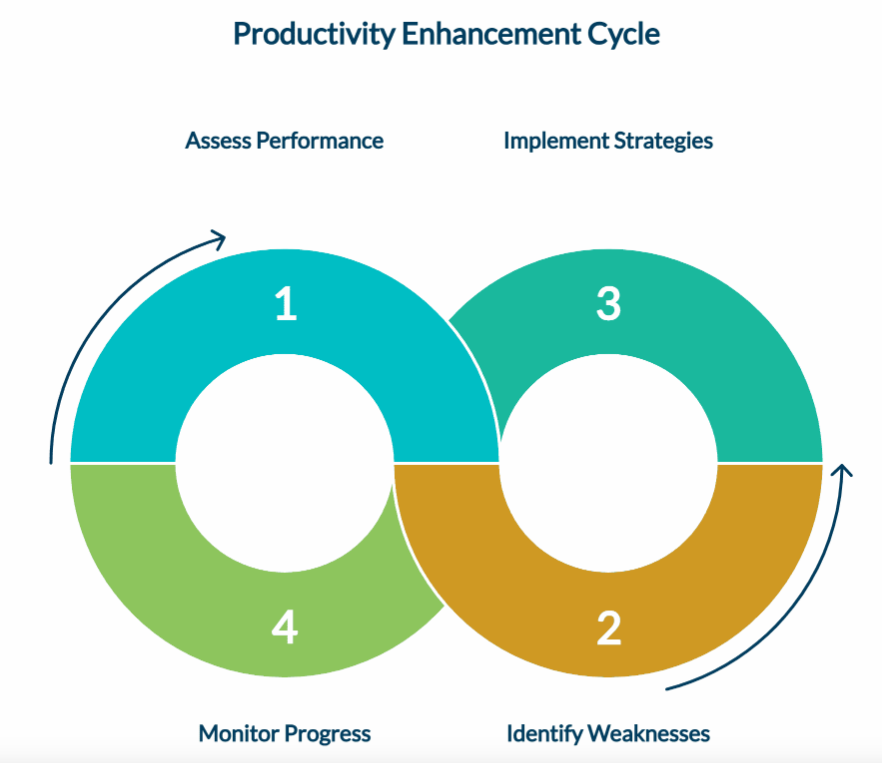
How to Implement Productivity Management Software: A Practical Roadmap
Step 1: Start With the Problem, Not the Platform
The worst thing you can do is implement the software first and then reverse engineer. Avoid doing that.
To start with, first find out the specific business problem. It can be visibility into remote team performance, earlier identification of workload imbalance, or more objective review processes.
Whatever the real priority is, it can be the main problem. This helps you identify which system you want to implement in order to get the best results.
Step 2: Bring People Into the Process Before Launch Day
Once you implement the solution, the adoption rate of employees depends on the clear communication that you have provided.
Employees who understand what the system tracks, why their organization is implementing it, and how the data will and will not be used are far more likely to engage with it as a tool rather than resist it as a threat.
Be specific. Vague reassurances do not build trust. Clear policy statements do.
Step 3: Configure for Context, Not for Everything Possible
Remote-first organizations have different monitoring needs than in-office operations.
For example, high-trust creative teams have different requirements than compliance-heavy regulated environments, where a documented standard operating procedure keeps monitoring policy consistent
Configure the system to capture the data that matters for final decisions. It’s not necessary that you technically collect every data point.
Step 4: Connect It to the HR Systems Already in Use
Productivity data connected to HRMS, performance management, attendance, and payroll produces insights. Businesses that also use CRM with project management software can connect customer interactions, project progress, and employee productivity in one ecosystem, making it easier to align workloads with business priorities. As organizations adopt more intelligent workplace systems, AI integration consultations can help you connect productivity data with existing platforms and automate analysis across employee workflows. Organizations looking to build these automations internally often rely on an AI agent builder to create assistants that can analyze productivity trends and trigger workflow actions across connected systems. Productivity data sitting in its own silo produces reports.
The integration question should be a part of platform selection instead of an afterthought post implementation.
Step 5: Establish a Review Cadence and Use the Data
Let us consider that you collect the data from everywhere but do nothing with it. This reduces the confidence of employees in the system.
Set a regular routine for reviewing productivity insights, weekly for operational decisions, monthly for workforce planning, and make sure there is a clear process for transforming the data insights into quality decisions.
Step 6: Revisit the Setup as Your Organization Evolves
Team structures change. Workflows evolve. The system that fits your organization at implementation may not fit it eighteen months later.
Build in a periodic review of whether the configuration still captures what matters and whether the insights being generated still align with your current strategic priorities.

Leverage the Power Of Productivity Management Software
The organizations that understand what is happening across their workforce every day have a clear advantage over the team that is still making decisions based on assumptions.
Productivity management software helps in making data-led decisions. It shapes how you review performance, how you plan workload, how you develop people, and how HR connects operational data to strategic workforce decisions.
Qandle’s integrated platform brings productivity management together with performance reviews, goal setting, attendance tracking, and people analytics in one place. Book a personalized demo and see what that looks like for your organization.
Productivity Management Software FAQs
Productivity management software gives managers consistent visibility into work patterns and output across distributed locations. This software does not require physical presence or constant check-ins.
No, if it's implemented transparently. Ensure clear communication with your team about what is tracked and why. Productivity software creates accountability. Most platforms offer configurable monitoring levels to match organizational policy and compliance requirements.
It replaces subjective impression-based assessments with a continuous record of real work patterns and output, thereby making reviews more objective, specific, and less vulnerable to recency bias.
Software You Need For All Your Productivity Management Process